How I Fixed "The API Key Appears to Be Invalid or May Have Expired" When Connecting Kimi K2.5/K2.6 in OpenCode
Getting "The API Key appears to be invalid or may have expired" when using Kimi K2.5 or K2.6 in OpenCode? Here is the exact fix that worked for me using Moonshot AI instead of the Kimi Coding provider.
I have been trying to reduce my AI coding costs lately without sacrificing output quality, especially for frontend and UI work.
Right now, my setup is pretty simple:
- DeepSeek models for backend logic and reasoning
- Kimi K2.5 / K2.6 for UI generation and frontend assistance
- OpenCode as the interface to connect different models through APIs
That combination is usually more cost-efficient for me than relying entirely on subscription-based coding tools. I wrote more about that shift in Why I am moving from Cursor and Claude Code to API-based AI coding workflows.
Quick answer
If OpenCode shows:
The API Key appears to be invalid or may have expired. Please verify your credentials and try again.
while you are connecting Kimi K2.5 or Kimi K2.6, the fix that worked for me was:
- Use the Moonshot AI provider instead of the Kimi Coding provider.
- Paste the same Kimi / Moonshot API key.
- Select Kimi K2.5 or Kimi K2.6 as the model.
The key was usually fine. The problem was which provider OpenCode was using.
Why I started moving away from subscription AI coding tools
Tools like Cursor and Claude Code are excellent. The friction for me was cost efficiency, not quality.
With subscriptions you often:
- Pay monthly whether usage is heavy or light
- Hit practical limits; after enough use, some tools push you to slower or weaker modes
- Feel pressure to “maximize” the subscription before the month ends
For example, with Cursor, after intensive coding rounds my faster API allocation would run out and I would get pushed into Composer-style limits for the rest of the billing cycle. With Claude Code, heavy premium model use adds up quickly.
That is when API-based workflows started to make more sense.
Why I prefer API-based AI coding workflows
With APIs:
- I pay when I actually work
- Less anxiety about “wasting” a flat monthly fee
- Easier to combine specialized models
- More flexibility long term
Rough split I use:
| Task | Model |
|---|---|
| Backend logic | DeepSeek V4 Pro |
| UI / frontend generation | Kimi K2.5 / K2.6 |
| General assistance | GPT models when needed |
A hybrid stack like this is often cheaper while still producing strong results.
Why I wanted to try Kimi K2.5 / K2.6
I kept hearing good things about Kimi for UI work. Compared with premium frontier models (Claude Opus, GPT, and so on), Kimi looked much more cost-effective for that slice of work.
I am still validating long-term pricing for my own usage, but early impressions on frontend and UI generation have been good.
I connected it in OpenCode with the /connect flow. That is where the error showed up.
The exact error I got
After selecting:
- Provider: Kimi Coding
- Model: Kimi K2.5 / K2.6
- API key: copied from the Moonshot / Kimi dashboard
I kept seeing:
The API Key appears to be invalid or may have expired. Please verify your credentials and try again.
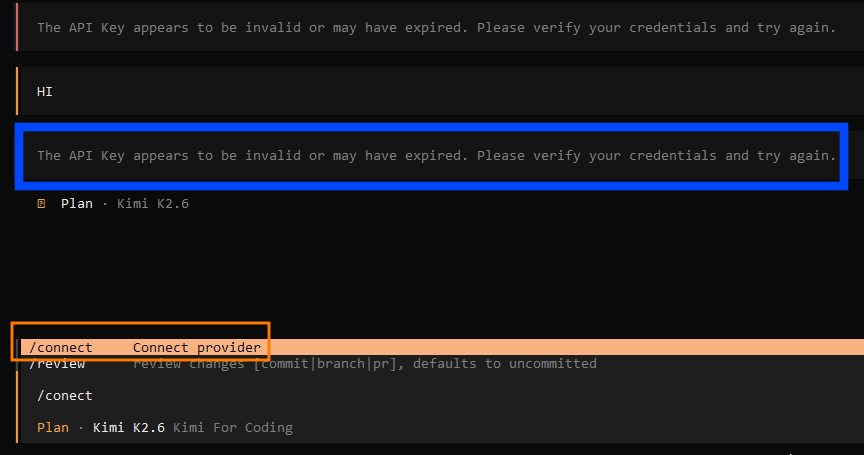
My first guesses were wrong key, expired key, empty balance, or a changed endpoint. None of those turned out to be the issue.
The real fix that worked
Instead of Kimi Coding, I selected Moonshot AI, pasted the same API key, chose Kimi K2.5 or Kimi K2.6, and connected again. It worked immediately.
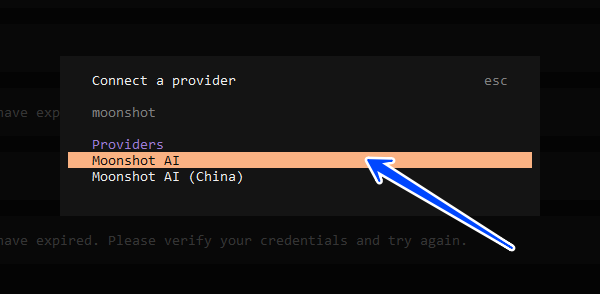
So the failure was tied to provider selection in OpenCode, not the key itself.
Why this happens
From what I could gather, this looks like a known rough edge for some OpenCode users: the Kimi Coding integration path can reject keys that are valid elsewhere, while the Moonshot AI path accepts the same credentials and routes to Kimi models correctly.
If your key works in other tools but fails under “Kimi Coding” in OpenCode, switch provider to Moonshot first before you burn time regenerating keys.
Additional checks that are still worth doing
Even when the root cause was provider mismatch, these are sensible:
- Re-copy the API key — watch for trailing spaces or a broken paste. Copy again from the Moonshot dashboard.
- Check account balance — some providers surface generic “auth” errors when credits are empty.
- Confirm model selection — Moonshot AI provider selected, then Kimi K2.5 or K2.6 as the model.
My current AI coding stack
| Purpose | Tool / model |
|---|---|
| Backend logic | DeepSeek V4 Pro |
| UI / frontend | Kimi K2.5 / K2.6 |
| Multi-model routing | OpenCode |
| Heavy reasoning | GPT or Claude when it is worth the cost |
That gives tighter cost control than leaning only on expensive subscriptions.
Final thoughts
Subscriptions are not “bad.” They make sense if you code at very high volume every day.
If your workload varies, you only have intense bursts sometimes, or you want tighter cost control, API-based workflows can be more economical. Combining specialized models instead of forcing one expensive model to do everything has worked surprisingly well so far.
If you see the Kimi API key error in OpenCode, try Moonshot AI instead of Kimi Coding before you regenerate keys. That single change fixed it instantly for me.
Related: Why I am moving from Cursor and Claude Code to API-based AI coding workflows
Tags
Enjoyed this?
Get notified when I publish new articles. No spam, unsubscribe anytime.
Or follow via RSS